Showing posts with label android. Show all posts

Friday, July 22, 2011

Why Switch to Android?

If you're a typical Blackberry or Symbian user, this article would be helpful as both are burning platforms already. If you're an iPhone user, get lost--there's just no talking sense to you. Kidding. This article will discuss why you should consider moving to Android if you haven't tried it yet. As with most OS out there it has its strengths and weaknesses. If you, like me, are OK with those and find that this is the OS for you, then by all means, I invite you to dive into Android. Below are some of the reasons why you should make the move to Android:

1. Customizability
No other OS in the market right now is capable of the customizations and flexibility that Android is offering. What do I mean by this? Simple, you can make your phone look and feel as you please--with a little reading and sometimes help from the mighty geeks of XDA forums. You can change the wallpapers, replace the messaging app with one that can go with a theme, install games, get themes for your browser. Basically, just about endless skinning to make your phone YOU. You can also place shortcuts to apps and mini app interfaces called "widgets" which you can interact with to do simple tasks like getting your latest tweets, checking the temperature, or getting news feeds. Compare this to an iPhone where the most you can do is change the phone's wallpaper and group your apps together.

These customizations also allow you to easily access data and function. This, I will discuss further later.

2. Choice
Android really wishes you options. And with it your favorite manufacturer. Ranging from an uber expensive HTC Sensation to the very cheap but well-spec'd ZTE Skate, there is no running out of options for every budget class in Android.

3. One-click Access to Data
In an iPhone, you need three taps to turn on/off the wifi, Android can do it with one tap if you've placed a wifi toggle widget on your homescreen (in Samsung phones, the wifi toggle is omnipresent when you pull down the notification bar). You also don't need to open your twitter app to read tweets if you've placed a twitter widget on your homescreen. Similarly, you can hold the power button to turn on your data connection with a tap from the menu that will pop. All these require more than 1 tap on other devices, and that's not even half of the things you can do faster with android. There's voice to text and text to voice, a comprehensive notification system that make accessing missed calls and messages unintrusive, a pattern unlock system (which is harder to guess and easier to unlock by swiping as compared to numpad locks), and even swipe message input (ex. Swype, Slide It).

4. Value For Money
As of this writing, the best Android phone--the Samsung Galaxy S II--is priced at PHP 29,990 or approximately $697.00 for the 16GB model. The iPhone 4 is priced at around $720.00 for 16GB and $860.00 for the 32GB model. Given that the Samsung Galaxy S II offers unbeaten hardware and software features (8MP camera, 1080p video recording, Super Amoled Plus screen, dual-core CPU, 1GB RAM), Android feels like a bargain at this competition. Then you also have your cheaper droids who can do good jobs as well.

5. Future-Proof
Over 550K (as of this writing) Android devices get activated daily. That number is more than any other smartphone platform out there, simply Android has too many manufacturers and has become popular over time. If you compare it to BB OS, the fledgling WebOS and Windows Phone 7, and the dying Symbian and MeeGo, Android seem to be the star student (along with iOS) whose future seem bright amid accusations of plagiarism and cheating (patent infringement suits from Apple). Support for this OS will be healthy for years to come, that's what it means. Hardware innovations (dual-core processors) also appear first on Android than on any other smartphone OS.

6. Carrier-friendly
In the USA, the iPhone 4 is only carried by AT&T with the 4G version on Verizon. Here in the Philippines, iPhone is carried only by Globe so SMART and Sun subscribers have to make do with the moe expensive unlocked iPhones sold as much as $1093.00 or PHP 47,000.00 for the 32GB version. If you are one to stick to carrier offerings, then Android is more suitable for you.

7. Battery-replacable
Sounds silly, but one's inability to open the back of his phone and pull out the battery can be crucial for decision-making. Why? For one, you can always buy spare batteries to replace the one you have when it finishes up. For another, when an iPhone hangs, the only way to restart it is to wait for it to restart. When Android hangs, one can simply take off the battery and resume with life.

8. Expandable memory
Sure, 32GB of memory is more than enough, but with SD cards getting cheaper by the day, One can simply opt to buy memory cards to save money. Right now, a 16GB SD card is on its way to the market. For most Samsung devices, 16GB of ROM is available and expandable with a memory card. Sure sounds like a treat.

9. Larger  displays
Yes, Android has 4.2 and even 4.5 inches wide displays, while iOS contents itself with 3.5. Bigger displays, more enjoyment on media consumption. Nuff said.

Be aware, however, that there are still some issues that plague Android:

*Lags
 It's no secret that Android lags / stutters from time to time. If your phone is on Gingerbread, dear, you haven't seen the worst. I've been to Donut, Eclair, and Froyo, and I must say that Android has gone a long way and has been more and more polished. Apps over time also improved and less lags are experienced now, though if you merely use your phone for texting, email, and calling, some internet, video, and music, basic stuff, lags are rarely experienced.

Some users may find that when you have your phone in Auto-rotate, it becomes slower. This is sadly something that I have not seen any improvement on, though I have barely found any reason to turn auto-rotate on my phone, possibly because of my phone's big screen and the swype text input. Android is originally made for portrait operation, which possibly explains why this is far from being as fluid as the iPhone's.

*Short Battery Life
In my 8 months of owning two different Android phones, I can say that Android is power hungry. For some reason, it is impossible to make it through 24 hours with a single charge even when all you do is call and text. This has been a recognized weakness by Google and they have been working on it slowly building over this weakness with each iteration of the OS.

*App incompatibility
Some apps in the market just won't work on some phones. For instance, you can't expect to effectively use Skype video calling on your Xperia Arc when it does not have a front facing camera, though you can use the rear. Some apps are also are prohibited from installing on lower OS versions due to some function / library missing in that OS version. Some won't operate right due to screen resolution, and some won't have a proper display due to the graphic chip of choice your manufacturer chose. In essence, this is called Fragmentation. Google is slowly managing this problem and is expected to resolve or ease fragmentation with the next iteration (Ice Cream Sandwich 4.0)

There you have it. Some of the desirable and some noteworthy weaknesses of Android. Ready to swithc yet?

Wednesday, July 6, 2011

Top 7 #4: Our Android App Pick for Jul 2011

When Android first started, apps weren't that many and people complained how sluggish it is compared to, say, iOS. While it is still a bit behind iOS in terms of overall polish, Android is still very usable and intuitive, and the app library has also grown to include some of the great apps that helped keep the iPhone's and iPod Touch's popularity. These days, apps make or break you, and in Android's case, the expanding library just makes it. Now we can say, "Angry Birds, that's so 2010," and move on to playing other games or scrap Seesmic in favor of a dosen other Twitter client. So without further ado, here is our recommended list of apps for you to check if you are an Android owner.


1. Cut The Rope
This one's new, highly anticipated, and long overdue (though not as long overdue as Plants Vs Zombies): ZeptoLab has just released Cut The Rope's Android port first via GetJar.com (which means it's free) then a paid version to the Android Market. While iOS users may scoff at the idea that Cut The Rope has just got to Android, this move only proves that developers are embracing Android more and more. The premise of the game is simple, you picked up a candy-loving monster on your doorstep and you need to feed it candy by cutting ropes attached to the candy. There is no difference at all between Android and iOS's Cut The Rope, except that Android users get theirs free (via GetJar).

Requires Android 2.1 up, analytic mind
Free on
GetJar, 0.99 USD on the Android Market


2. Go SMS Pro
This one ups Android's usability by a notch. Go SMS Pro is an messaging app replacement for Android. Go SMS Pro offers functionalities like scheduled messaging, private folders, folders, inbox and conversation screen theming, iPhone emoji use, and contact blacklisting. You can switch from three modes: simple--which basically is just like your stock sms app, pro (all extended features like themes and emoji), or custom to get additional features at a faster speed compared to pro. What makes Go SMS Pro is the very polished user interface and fluid usability, all while dishing great features.
Requires Android 1.6 up
Free on the Android Market


3. imo.im
These days, users have one too many online accounts, that or they have friends on different instant messengers, as downloading all the clients for your say 4 different instant messengers seems like a losing proposition, you feel the need to use just one app to communicate with everyone on the loop. And there's imo.im for that. imo.im supports the most popular instant messaging services like YM, Skype, MSN, Facebook, and even MySpace chat for good measure. How great is that? And what's more, you don't need to create an account to use imo.im (compare with meebo). This is ideal for people who find Skype and YM Android ports as cumbersome and resource-hungry.

Requires Android 2.1 up, lots of online love
Free on the Android Market


4. aDownloader
Ideal for people on the go with powerful data plans yet can't catch last night's episode of True Blood. aDownloader's selling point is that it downloads files via peer to peer sharing. While the user interface ain't that great yet, it sure works like a charm able to download files like it does on a computer. Caveat though is that some phones might experience slowing down while aDownloader is at work. But what gives, where else have you seen a phone with a torrent client? Also to note from the developer is its YouTube video downloader (which has been taken off the market long ago but is still available for download from the developers' page).
Requires Android 1.6, SD card, and fast internet connection
Free on the Android Market with an alternate version with native torrent search available at android-a.com


5. Go Launcher EX
When I first got to Android, the first launcher I've tried using was Launcher Pro and stuck to it for a long time. Over time, Launcher Pro remained relatively unchanged with several key features missing on the free version. It also suffered from severe lack of customizability, though it was usable and one of the fastest launchers around. Taking cues from Launcher Pro and ADW Launcher, Go Launcher rises to be one of the most flexible, fastest, and most customizable launcher available in the market, with all features free! The only thing you pay for with Go Launcher EX are the premium themes which you can do without. They have even made a documentation on how to make a theme of your own.

Requires Android 2.0 up, will to change your homescreen
Free on the Android Market


6. Visidon Applock
Afraid your mom / friend picks up your phone and sees your porn stash? How about your number one picking up your phone and sees number two just sms'd that she can't make it later for some "fun and games?" If you say aye to all that, then we might just have the app for you. Visidon App lock is an app that blocks unauthorized access to your apps such as your Messaging Apps, Gallery, Market, and Video Player apps for starters, but what sets Visidon aside and propels it to awesome is that it uses your facial features to unlock these apps. And, as with most android apps, it's free. Just pose and say cheese to take pictures of your face so your phone will recognize you when you need to unlock these apps. Unfortunately, this app needs a front facing camera to work.

Requires Android 2.3 and up, a front-facing camera, and your pretty face
Free on the Android Market


7. WidgetLocker Lockscreen
Admit it, Android lockscreens are boring if not downright corny and anti-climactic to Android's 1-click access to every information philosophy. Someone saw this and thought that perhaps things need to change. At a price. WidgetLocker is a paid Android app that allows you to customize your Lockscreen so that you can actually place widgets and app shortcuts on your lockscreen. Nifty, eh? Not only that, you can also download custom designed unlock sliders that suit your taste. Say you want HTC Sense's unlock slider on your Samsung Galaxy S 2, they have it here? How about iPhone's unlock slide on your HTC Evo to make it really similar to an iPhone but with a bigger screen? Sure, it may not be able to grant you three wishes, but WidgetLocker lockscreen prettifies your lockscreen or makes it really usable (like say a music player widget on your lockscreen for starters).

Requires Android 2.1, some dough to buy the app
1.99 USD on the Android Market

Any app you'd like to suggest or feel we missed? Special Thanks to Mark Bolinao who has suggested a lot of these apps.

Thursday, May 5, 2011

Sony Ericsson Announces Xperia Mini and Xperia Mini Pro


Finally, after months of being filed under the "rumored" department, Sony Ericsson just went public with their upgrades to the X10 Mini and Mini Pro. Simply touted as XPERIA MINI and XPERIA MINI PRO, these two droids claim to fame is their being the world's smallest HD-video recording smartphones. Both continue on the X10 MINI/PRO's diminutive size with the Mini measuring 88 x 52 x 16mm (length, width, girth) while the Mini Pro checks in at 92 x 53 x 18 mm.

While I feel that both are a tad too thick to compare with their predecessors, their spec sheets tend to defend their girth. Both handsets feature 1GHz of CPU power (QSD8255 for the Xperia mini and the MSM8255 for the Xperia mini pro, meaning the PRO has better video playback and capture due to the video chipset embedded in MSM8255) and 512 MB RAM--on paper, that's the XPERIA Arc inside the Mini Pro and the original X10 biggie on the Mini. The camera will have to disappoint a bit as they couldn't squeeze in an 8MP snapper, so buyers will have to make do with 5MP and LED flash. Good news is that these two can record 720p videos (1280 by 720) unlike their predecessors--upto VGA only.

Both also ship with tight FB integration (a Like button, for instance, on the Media Player which will show your friends what tracks you like and a dedicated tab for FB updates on the Call Logs to name a few) and Android Gingerbread 2.3. An improved 4-corner UI experience is also to be expected as unlike on the X10M/P where only 1 widget or icon is allowed per screen, in here you can add multiple as long as there's space. The 4-corner shortcuts can also take in more than one item (makes it like act like folder).

Now we are seeing Sony Ericsson stepping up their game. I always liked SE's hardware design. The original X10 is one of the most beautifully designed handsets, while the Arc screams extreme sophistication with its arched 8.7mm back. These two are no different, although a bit clunky. While their predecessors came out with an outdated Android OS and 2.5" LCD screens, these two came out strong with bumped up specs and the latest Android OS. I feel like these steps in the right direction is sure to put the veteran manufacturer back on its feet.

Sources: GSMArena, Engadget

Wednesday, February 16, 2011

MWC 2011: Android is Thus Differentiated

Back in 2010 when I was evangelizing a number of friends to go Android, I hear a lot of "Why are they all doing Android? They're all the same now." True. There is very little differentiations between each brand. I wouldn't even dare think the UI skin was enough factor for differentiation for each brand. These Android devices are pretty much the same as the other with hardware (performance and handling) and shallow UI skin (aesthetics) differentiating one from the other--but slapping a LauncherPro over any of them leaves you with the same interface and possibly the almost the same experience. Given that I have tried several Android phones and a tablet last year, I can say that I do get the impression sometimes that they're almost the same and nothing differentiates one from the other so much.

Here comes 2011 and the on-going Mobile World Congress in Barcelona and everything gets a little bit more different. As predicted, 2011 will be a little more exciting than 2010 for Droids. We see manufacturers going different ways to differentiate their product line, whereas in 2010 the race was centered around making a very usable phone with a good UI overlay. Let's review each company's 2010 standing and their new flagship strategies:

Samsung
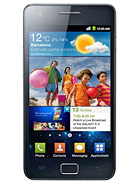
I wouldn't say Samsung was new to Android. They've been at it since late 2008 or so with their first Galaxy model donning an AMOLED screen--which unfortunately was expensive for its featureset and was stuck at Cupcake 1.5. Then after that came the Spica which got an upgrade to 2.1 and nothing more after. Then they hit it big finally in 2010 with the first Galaxy S introduced last April 2010. The strategy for Galaxy S was pretty simple: bombard all US carriers with a usable SUPER AMOLED equipped model. Galaxy S was in a nutshell a smartphone with multimedia capabilities running on a very catchy screen and that is where their new flagship Samsung Galaxy S II seems to be going for, too.

What's in the Galaxy S II? Well, it has a dual-core CPU, 1GB of RAM (Hello, MOTO Atrix), and 4.27 inches of SUPER AMOLED PLUS screen. It is quite complicated to discuss how different S-AMOLED is from S-AMOLED+ but basically S-AMOLED+ results in better image sharpness and smoothness by not using a technology they used in S-AMOLED, making it somewhat more pixel dense. Not sure I explained it very well, but that's how it is in layman's terms. And as per reviewers, S-AMOLED+ really is stunning. I do suppose so. But realizing how different my S-AMOLED SGS's screen is from my X10's LCD, the only difference I can really see is the viewing angles. X10's viewing angles are poor. But in proper viewing angles, the differences are subtle (blacks most definitely). What's another thing to be really excited about is just how thin this device is. 8.49mm. Yep, folks, 2mm thinner than XPERIA Arc announced last month at CES. This is apparently because of the S-AMOLED+ having a mere 2.1mm footprint only. 8MP camera is also included on the device and a proper LED flash is installed, too, as compared to the original Galaxy S which lacks one. As for the 8MP camera, I'm keeping my reservations as the 5MP installed on the SGS kind of struggles to get resolved detail. Maybe they'll get it right this time for the SGS II. That said, Samsung is going more for the All-in-one package route, the same route that the original Galaxy S took. Unfortunately, the price seems to be around 650 Euros or 38,000 Philippine Pesos. Yikes!

Beside the awe-inspiring Galaxy S II, Samsung has merely budget offerings, and the Galaxy Tab 10.1 running Honeycomb.

LG
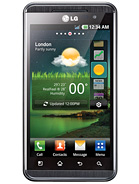
LG almost totally snubbed Android until the later part of 2010. For a proper experiment, they released the lackluster LG Optimus, which was shipped with Android 1.6 and, of all the things, a resistive screen. They were pretty silent until they released the low-end solution LG Optimus One running Android 2.2, which was the latest Android OS during the time of its launch. This placed LG somewhat as an outsider on the Android race last 2010. But then they surprised everybody last December with LG Star or LG Optimus 2X, a handset rocking a dual-core CPU. When my non-Android friend heard this, he was like, "really, they have those on phones now?" Well, it's the proper way for things to go, anyway. But we won't see any use for the dual-core CPUs until probably Q2 when dual-core utilizing apps are available to use the dual CPUs. As for now, they're like future investments and would make for awesome synthetic test results. So where is LG headed? Apparently, towards the Innovation route. They are still experimenting and having fun tossing out devices with odd features that has no competition. LG Optimus Black, again another CES debutante has an S-AMOLED-rivaling NOVA screen, which was apparently better than iPhone's IPS LCD and scores a very thin 9mm. Their flagship smartphone goes for another first: stereoscopic 3D. LG Optimus 3D goes for wow factor as it comes with a 3D UI and 5.0 MP 3D imaging and 1080P 3D video capture. It doesn't go for thinness, though as it maxes out at 11.9mm, but it's not selling that. Thing is, the 3D ships with a 2.2.1 Froyo and given that the UI has been tweaked for 3D, I wonder how long it would take for its OS to get updated. Remember, though, that LG has not yet updated any of their Android phones so this is a test for them to see how fast they can update given that this is one of the things crucial to Android folks (ask Sony Ericsson).

As with fellow Korean firm Samsung, LG is releasing a Honeycomb tablet along the same price as XOOM. The LG Optimus Pad or the G-Slate. 

Sony Ericsson

Sad as it is for an SE fan like me, Sony Ericsson lost the 2010 Android race by not being able to provide timely OS updates to their XPERIA X10 line. Their flagship XPERIA X10 was lauded and met with so much hopes when it was announced at last year's MWC. Unfortunately, it shipped with Android 1.6, unable to do multitouch, and can't perform without lags thanks to TimeScape and Mediascape tied into almost everything. That and the fact that the phones are locked to their very core relegated the X10 to casual user / SE fanboy use. Given their learnings from the X10, SE now plans to recuperate with 4 Droids. First announced last CES was the XPERIA Arc famous for its slim and elegant profile and the first one among their devices to use the Bravia Mobile Engine when you turn up your video or Internet. Sadly, the MBE does not work on the main UI and we get a simple LED backlit LCD device. MWC debutantes were the Vivaz refresh aptly called XPERIA Neo (seems to be priced around 480 Euros or 28,000 Philippine Pesos, cheapest among the bunch), XPERIA Pro (500 Euros and has a slide out QWERTY keyboard), and their main differentiator, the XPERIA Play, which is touted as the first PlayStation-certified Android device (iPhone 4 being the first Playstation certified device). The XPlay is the first of its Android class having a slide out PSP keyboard which should come nifty when you need to play games those PSP games. But that's not all, Sony Ericsson seems to be going the Gaming route via Sony NGP's gaming ecosystem. If you knew about Sony's quad-core portable gaming console from the future, the NGP, you would know that it swaps out UMD games for OTA available games via the Sony Playstation Market--which will have games playable too on Android devices. As that seems the main qualification to have games published on the PS Market, it is quite inevitable for the Xperia Play to have titles eventually, especially since it seems quite no-brainer that the NGP will succeed and sell. This formula seems to me like a proper win readying to be cashed out, whether it is just for the Playstation Market (remember as long as the device is PS-certified, they can buy stuff from the market and play with other devices like an iPhone 4 or an NGP) or the XPERIA Play, or for them both, or for the whole Android community (remember how sucky Android games are). Aren't you glad they came up with this idea? My main contention with SE's flagship is that it is too expensive at 650 Euros (same price as the SGS2 or the Sii), too bulky, and can only take 480p videos via a 5MP module. No way for a flagship to be given that the race is about thinness and video recording these days. Seems to me, SE does not really want to participate that race and would be more than glad to have compromises. Oh well. We'll see if this is another XPERIA X10 waiting to happen or a winning formula to give SE enough cash for more R&D.

I also wish they have shown the new minis that have leaked a few months back--which run 1GHz processors. But those might see a post-MWC announcement, just as the first minis.

Motorola
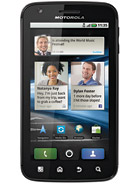
Motorola completely rose from the ashes in 2010 thanks to their Android efforts. They probably made the most Android phones among the manufacturers that it's been hard to keep track of their models: Droid, the Droid XT720, the CLIQ, the Backflip, the DROID X. Oh, the list will just go on and on. Then at CES 2011, they revealed two new phones: The Droid Bionic and the Atrix, the latter being their flagship phone for 2011. What makes the Atrix so good? Well, it has pretty much the same specs as the Galaxy S 2, save for the screen where Motorola still is stuck with LCD but graces the Atrix with a 540 by 960 resolution. So what differentiates Motorola Atrix from the rest of the Droids out there? Well, the Atrix comes with a desktop dock and a laptop dock. Come again. Yep, you heard it right, a laptop dock to put your Atrix on.

While the desktop dock will make the Atrix a desk display clock, the laptop dock will make it a, well, laptop. Or a netbook. How Motorola managed that is by using an interface between the phone and the dock that will result in the dock displaying the phone's screen / function in a different interface. Impressive sounding as it may, engadget was more than happy to buy a netbook instead for all the cost this will entail. Motorola seems to be differentiating their product by going the Personal computing route, making their phone feel closer and closer to closing the gap between smartphones and PCs.


HTC

HTC had a laudable Android run in 2010. The Android veteran came up with Desire, Desire HD, Aria/Gratia, Wildfire, and Desire Z. Their timely Android updates on their units plus top-notch user experience gained them the goodwill of many patrons who turned in and became fans. Many looked at the experienced company as the role model for Android manufacturing, with HTC Desire being praised by techradar as the top GSM Android phone of 2010. So it was logical to anticipate what they have been up to. For all the hype and supposed leaks that have come out since they showed the world that they can throw out a Desire HD and Desire Z out of whim, the products they presented on the MWC was pretty underwhelming.

First up, they announced two smallish Facebook button-totting phones, the ChaCha and Salsa. These much rumored "Facebook phones" were merely Android devices with tight FB integration and an FB button, both are not very ambitious phones. If those weren't underwhelming enough, HTC announced the successor to their Wildfire line. The Wildfire S features almost exactly the same specs as the old Wildfire, but sports a 3.2" screen. As for their flagships Desire S and Incredible S, HTC decided to go again for the user-experience route, completely ignoring hardware this time around as the Desire S and Incredible S both feature almost identical hardware with their predecessors. The Desire S gets an Adreno 205 GPU, as with other MWC 1GHz debutantes (which makes for better gaming, imaging, and video playback) and a unibody aluminum case. It also ships with Gingerbread too. Other than that, changes are subtle. The Incredible S is almost basically the same as the CDMA Incredible in America save for the auto-rotating capacitive buttons. This one however ships with a Froyo, which is kind of a shame considering the Wildfire S is sent to the world with a Gingerbread.

It is also worth noting that HTC has a tablet that comes with a capacitive pen. This tablet however runs Gingerbread and is built around HTC's Sensation skin for tablets and the capacitive pen. Other than that, it is your typical iPad-killer, proving even more that HTC, for this MWC could care less about hardware and is really going for the kill by providing useful and usable software on their Android models. Same-same, they don't want to stray away from their smartphone ideas.

Non-Droids: Nokia

Oh how the mighty have fallen! Nokia's 2010 sales still put them on top of the manufacturers' list but how their sales have hit a slump and if anything, it's taking them quite some effort to recover. Not only that, majority of what got them to top is not their high-end sales, but their low-end and mid-end offerings, which has the same functions and features--signs of a company refusing progress. To remedy this, last Feb11, Nokia and MicroSoft announced a partnership that may change the whole game: Nokia to soon dump Symbian and/or MeeGo plans and make Windows Phone 7 As their main smartphone strategy. While that is something that we are yet to see if it will have any success, market experts predict it is a good partnership and would give Nokia and MicroSoft the coverage they need. Nokia will have a software platform that is as usable ans Android and iOS and WP7 will see greater sales by being carried by the biggest mobile phone manufacturer. Sounds good? Probably not as good when we look back that this partnership between Palm and Windows Mobile killed Palm. But who knows, Windows Phone 7 is tons smarter than Windows Mobile.

At the MWC, it was made clear that that partnership's goal is to defeat Android. Quite ambitious, isn't it? Images of the Microkia concept devices has since been floating around the web after the partnership was announced. How this partnership will go is yet to be seen, but it's a pretty exciting combination of powers. Now we wonder, will Windows Phone ever gain the prominence they are dreaming? What will happen to Symbian and MeeGo? All that and more are yet to be seen and 2011 now seems pretty exciting.

Non-Droids: Apple

The MWC felt like an alliance more than a fight, actually. All these manufacturers gearing up to demolish Apple's dominance on the smartphone race. And what choice does the Cupertino giant have but fight back. New rumors have been swirling outside of MWC about Apple making a smaller iPhone so far being dubbed over the net community as the iPhone Nano. Speculations began from early leaks of information from trusted tipsters and the fact that Apple sourced affordable smartphone materials from Samsung. Several rumors about it have been spreading since then, but the most controversial being its lack of local storage relying completely on cloud-based apps and music service, which I find pointless for most developing countries--which I think is the target of this cheaper device. Engadget thinks this is a possibility but not a technology people of 2011 might be up to accept. Given that the iPhone Nano will be a cheaper alternative for those who can't afford real deal iPhones, teens and developing countries come to mind, save that a cloud service would cost so much more than what you have actually saved.

Other than the iNano, the iPhone 4 successor rumors of having a bigger 4" screen has also been circulating. Other rumors include an 8MP camera module and a slide out keyboard (mostly targeting business-minded people). The idea of having more than one iPhone model for the next generation is a pretty exciting idea, don't you find? Given all these, 2011 seems much more exciting than 2010 for Mobile consumers and connoseurs.

Non-Droids: HP (Palm)

In case you've been living under a rock you would have missed the whole MWC, Nokia-Microsoft partnership and Pre's revival. Pre 2 which was met with much lukewarmth last year finds a worthy successor under the Pre 3 hood. Complains of the Pre 2's underwhelming specs were reworked with much success and zeal on the Pre 3--which is equipped with a 1.4GHz CPU and 512 RAM, pretty much ready to blow away your standard high-end Android smartphone. And while those specs do not match the dual-core might of LG, Samsung, and Motorola, the Pre 3 that runs Web OS 2.2 has additional skills other smartphones wish they have. It can communicate with the WebOS tablet! Yep, there's a WebOS tablet, too, which is another reason for HP to celebrate. And the way WebOS is being worked to make all HP appliances talk seamlessly seems like a good thing especially after seeing the Pre 3 and WebOS tablet talk.

Other than the Pre3 and the WebOS tablet, the HP Veer was also announced last week, Feb 10, which made the X10 mini pro, the world's currently smallest smartphone with a keyboard, shy. Veer comes in with a much smaller at 15mm of thickness. It would be interesting to see how this new slew of WebOS devices perform.


2011 Outlook

Given the range of developments from manufacturers, 2011 is another exciting year for Mobile consumers and enthusiasts. Android has garnered enough support and attention while Windows Phone 7 has found an ally in Nokia which should make the competition look like Android vs. iOS vs. WP7 vs. WebOS vs. RIM. We'll be seeing how each platform stock up against the other with Android mainly being about diversity and iOS being about ease of use and conformity. Wp7 and others are yet to make their minds, but as it looks like other manufacturers are backing away from the Mobile OS and concentrating on the Android battlefield. It is also worth noting that Sony Ericsson has not presented any tablet. Rumors are that it won't. Ever. And that the Android tablet will be from Sony with a PlayStation branding (not VAIO). How this will look is yet to be figured out. Also, let's not forget about RIM's Playbook which has been lauded, too. And of course the iPad 2--which is not a 1st gen device (thus worth looking into) and is rumored to have a front-facing camera and a usb port for plugging in those sticks.

Ain't 2011 so exciting?

Wednesday, December 22, 2010

Things to Remember Before Getting a Galaxy S

The Samsung Galaxy S

In true jerkysans fashion, I got the Galaxy S without batting an eyelash. Not! I have had some serious issues with my first Samsung smartphone (i900 Omnia--buggy wifi, software, irresponsive screen, stupid updating procedures). While my experience with Samsung's very own bada OS-totting Samsung Wave improved the way I look at Samsung, something tells me that non-native OS is not their thing. Given those, I did some reading about it on the online forums and review sites. I mean, 27K is not a small amount and I will be stuck for two years with this device. I hounded down the usual suspects: GSM Arena praised it, for instance, for being a technological monster with great audio reproduction and amazing video capabilities. Engadget praised it for being thin and sexy while criticizing the lack of polishing in the UI. Techradar praised the processor, audio and video while commenting the slight freezing at times.

I have friends who have lined up for the Galaxy S from Globe, and I can understand why. The Galaxy S measures up to iPhone's popularity, perhaps due to its superb S-AMOLED screen. But that's all skin deep. The Galaxy is more than it's fast processor, Android OS, and S-AMOLED screen. You would need to live with it for a month before you can really say and mean it, "I want this phone."

Having the SGS for a month, I have compiled a list of things to expect and remember before getting your SGS.

1. It lags like hell, especially after Froyo 2.2 update
On Eclair, the SGS is pretty capable. Out of the box, you will encounter Techradar's "slight freezing at times" comment. But don't say, I can live with that just yet. Wait till you update it to 2.2. Froyo is supposed to make things go faster. But with SGS, this is the contrary. After updating my SGS to Froyo, I encountered inordinate amounts of lags that is not slight at all. The internet is filled with buzz about these lags and freezes and they were serious usability issues that I cannot live with and makes me want to flush the phone down the toilet. I've read up and this is caused by Samsung's building in an SD card into the device and using the wrong filesystem format. Or something like that. Luckily, there is a fix for this, in fact, more than one fix option. This requires some knowhow but if you have a friend who knows, you can get away with a blazing fast SGS. Else, you're stuck with a freezing device. So in case, read up. Just look up One Click lag fix or z4mod. This requires you voiding your warranty, on the other hand.

2. It comes in two variants 8GB and 16GB, should I get the 16GB?
What should you get? I suggest you get the 8GB. It is cheaper by as much as 4K. Save the 4K and get 16GB SD card, which gets you a 22GB total (I can count, but there will be some storage space your device cannot use). A reliable 16GB card is worth 1.2K. This gives you more storage and more savings. If you are getting one from a Globe plan, then 16GB is your only option.

3. Samsung has unwittingly built in some quirks to SGS
Like any other phone in the market, but these quirks will surprise and annoy you. For instance, the notification bar may not at times be pulled down. Sometimes it will get stuck midway, sometimes it will just be stubborn and not be pull-able. And this is the only Android device I know that does this. The resolution is to restart your phone. Another noted and popular bug is that the wifi may not always connect to your Home network. A number of users have complained about this and while there is a workaround--which is to launch the AllShare app with your wifi off--it is annoying to know that the wifi has issues. I read that this is due to the SGS's wifi logic being fussier and won't connect on a busy wifi channel despite your iDevices, laptops, and other devices being able to. The obvious resolution is to move your router's channel to a less busy one. This is apparent when the wifi channel you have chosen is crowded. Another issue is that the GPS sucks big time. Reports suggest that the GPS won't lock your position accurately or may take froever to do so. At release 2.2, the GPS has been improved, though still not that accurate. Then again, you'll bump into Froyo freeze trouble. Some users also report typos and grammatical boo-boos. Indeed such exists on the Samsung-made apps.

4. It is not an iPhone
Samsung designed the SGS to feel like the iPhone. This is apparent just by looking at the design for the SGS--it looks like one of those Chinese knock-offs. The form-factor which is very iPhone-ish, is a turn off. I mean why must they copy even the form-factor? Going deeper, the software suggests the same thing. Among the Android phones out there, SGS is the only to use a horizontal app paging system a la iPhone. Their music player also apes the iPhone's. So as the video player's feel. But really, much as they want it to be, it is not. I swear, the audio in my Galaxy S is kind of scattered. The trebles are broken and may hurt your ears at loud volumes. At low volumes the bass is just off and barely audible. The video on SGS however outdoes the iPhone's thanks to its bazillion codec support and brilliant 4" S-AMOLED display. However, I noted on my SGS that both the music and video player occasionally hiccups. Additionally, it does not have iTunes, so you will need to get your audio and video content ported to it manually.

5. It will fail you
So as other phones. But it's best that you don't experience this. After two weeks of ownership, I needed to do a factory reset on my SGS. The facebook app just won't open for no reason. And I've tried every workaround and solution available. To no avail. I also encountered audio and video hiccups too often. I did a factory reset and things went back fine. But I feel bad it failed me. Something the humble X10 has not experienced in my two months' of ownership. Moral lesson is always backup.

6. TouchWiz UI is nothing to write home about
Review sites are unanimous in thinking that TouchWiz UI is not value-adding. I also feel that the size of font they chose makes the phone feel low-res amidst it's WVGA resolution. On my X10, the messaging app can display 9 conversations at a time. Galaxy S can only manage 7. The conversation itself can only show 3 bubbles, while the x10 manages more than 5 at a given time. Same is true with the default phonebook.

7. Samsung Galaxy S's display is protected by Gorilla Glass
Gorilla Glass is a shatter-proof and scratch-resistant material. I have not touched much if the S-AMOLED screen is directly stuck with the Gorilla Glass, but I have a feeling it is. And in case, this will be a bad thing since if you need to replace your S-AMOLED screen in the future, you will also need to replace the Gorilla Glass, which is more expensive than normal glass. But then again, you have added protection. And most likely S-AMOLED will start to fail two years after purchase, by which time you have a new phone.

8. The Swype that comes with the SGS cannot be updated on its own, it updates with your firmware updates
That's right, you cannot update it. It does not have a Market or an OTA update from Swype. Registering as a beta Swype user won't help as you will still need to delete the Swype files manually and this requires voiding your warranty. Again. What's more painful is that the Swype that is pre-installed is, I think, one of the earliest releases. Swype is supposed to be eerily accurate, but this one is just a mess--prioritizing the names in your phonebook over the proper words in the dictionary. Of course, there is a resolution to this, but again, wouldn't it have been nice if they at least update it separate from the whole firmware.

9. S-AMOLED is nice, but the green tint is icky.
The Desire has a slight rosy tint. I can live with that, but greenish tint is a different story. I'm not sure why, but it does have and at first it is not noticeable especially if you use a prominently black background, but don one with a white, and it gets all too obvious--and all the more when the brightness is a bit low. This is not much a usability issue, but it's kind of iffy for me--movie viewing is still surprisingly pleasant and immersive and if this is your only device, you won't notice it until you compare it with another device.

10. Should I get one from a Globe contract?
If you ask me, hell no. Here are the cons: 1.) The lock in period is 3 years as of this writing. 2.) For plan 999, it is yours for 15K, sounds like a bargain, right? Then again, the lock in period is 3 years not 2 and Super Plan sucks because unlimited services will go on top of your "consumable" bill. 3.) There is, apparently, a waiting list--a long one. 4.) Since it is locked to Globe, firmware updates will take longer for your phone. 5.) It is locked to Globe and resale value is slightly less. If you were to get one, get the most expensive free phone from your chosen contract price, sell that phone, and add the money to get an unlocked Galaxy S. But if you plan to stay with Globe for a long time, say 3 years, then you might as well get for a cheaper amount.

I know I seem to have written more cons than pros, but those are warnings on what you might experience when you get one--not discouragement. The device itself is capable and most of the weaknesses are just things I find worth fussing about.

Most of the times, the Galaxy feels like an expensive device with a snappy response that it is. On some occasions (lagfix installed), it will feel like a kid throwing a tantrum. A large number of bugs have been written on forums about the SGS and chances are majority of this model has those bugs. Samsung's tagline for the SGS is "Expect the best," which I suggest you to "expect the buggy" instead--like I did since it's Samsung. Lower your expectations, read up more before getting this phone and see if you can live with the its weaknesses because the strengths are very apparent and are worth enough to get this device. If you can live with occasional lag (most androids have that) and the icky green tint on the display. Also note that I've said voiding your warranty often. Granted you can boot your phone, you can always revert to the "un-voided" warranty firmware version which should help you save on charges.

Sunday, December 19, 2010

In Review: Swype


If there is anything that made me feel more comfortable about using touchscreen phones other than capacitive screen technology, it is this piece of software called Swype. Introduced in 2008 back when resistive touchscreen is still pretty popular, Swype has not received greater acceptance until 2010 when they have released more beta samples to more users and after making Swype usable by Android and lately Symbian users.

The concept of Swype is pretty simple, instead of tYPE-ing, you SWipe across the keyboard (ergo SWYPE). Like in the screenshot above, I spelled the word "money." I start on the letter m, then slide to o, then n, e, then y.

Advantages:
* Very comfortable to use with one hand on portrait mode
* Eerily accurate
* Can remember words outside of the user dictionary

Disadvantages:
* May prioritize non-dictionary words over dictionary words
* Gets confused with short words (confuses is and us, live and love, our and or, etc) which you may find annoying in the long run
* On higher versions, imports phonebook names as dictionary words and prioritizes them (there's no response from the Swype team yet)
* Still on beta mode, higher versions does not install on unsigned devices and not available for free or paid--user has to be beta-listed by the Swype team
* May feel uncomfortable on larger screens due to wider spacing when on Landscape mode
* Typing words for the first time so Swype can remember them can be a pain.

Personal Opinion:
In my two months' use of Swype, I can say that switching back to normal keyboard + auto correct has been uncomfortable. I have been dependent on Swype for most of my handheld typing. In fact, after a week's use, I scrapped any plan of getting an iPhone 4 because Swype is not yet available for it. Even on my laptop, I sometimes wish there's a technology similar for it.

Drivers will love Swype as they can type with one hand while driving with very little effort. It can be eerily accurate to the point that you won't need to check whether you are swyping the right words or not.

Now for the downsides, I have mentioned how annoying it is that Swype remembers and prioritizes the names on your phonebook. For instance, I have a contact with a surname of ONG, when I swype "OMG" the choice window pops out and gives me the choices with Ong over Omg. Sometimes it goes straight to thinking I meant Ong. And I find this terribly annoying. I have looked up on the Internet and apparently, there is no solution for it yet only workarounds.

Also, since you will be Swyping with your thumb, you will most likely end up with a sore thumb if you do this often.

Overall, I still feel that Swype does more good than harm and is game-changing.

Score: 4/5

Thursday, December 16, 2010

Switching from iOS to Android: What You May Not Know

Update Jul 2011: Read the followup article Why Switch to Android to get more insights on Android.

I have a friend who recently switched to Android coming from iOS. Like most of my friends who did the leap of faith, he came to me asking, "how come it doesn't work like this, how come it doesn't do that, iPhone does that!" His questions are coming from the common stigma of iPhone users that Android is merely a copy of the iOS which has been played by the media. If you think this way, you couldn't be more wrong.

At first, before I tried Android, I had the same idea: it should work like the iPhone, only a bit less restrictive. But to my surprise, it didn't. Sure, it was a lot less restrictive, but it's not as iPhone as I think. If you haven't tried Android and have been planning the leap of faith, feel free to read the rest of the article. Below is a quick summary of the similarities / differences:

iOSAndroid
Popular DevicesiPhone 4, iPhone 3GS, iPhone 3G, iPod Touch, iPadHTC Desire, Samsung Galaxy S, Sony Ericsson XPERIA X10, HTC Legend, HTC Hero, X10 mini/pro, LG Optimus One, Samsung Galaxy 5, Motorola Droid, Nexus One, Nexus S
Sync SoftwareiTunesManufacturer-provided PC Sync Software
TetheringYesYes, 2.2+ (or workaround app for lower versions)
Flash SupportNoYes, 2.2 +
MultitaskingYes, by pausing apps in the backgroundYes, true multitasking
Hot-Spot CapabilityNoYes, 2.2+ (or workaround for lower versions)
FoldersYes (for apps only)Yes (filesystem-wide)
Copy and PasteYesYes
Video ChatNative support (only on iPhone 4 hardware or tweaks on 3GSYes (manufacturer-provided)
BooksSupport for iBooks to download and read digital books.Available only through add-on apps.
MusicAvailable through iTunes; automatic syncing with desktop iTunes. Streaming music only supported through apps.Built-in ability to play MP3 files, but no syncing with your desktop music. Streaming music available via add-on apps.
Apps300,000 iPhone apps100,000 Android apps
EmailUnified inbox (one inbox for all accounts), threaded messagingNo unified inbox, threaded messaging via Gmail
Claim to FameSilky smooth operation, there's an app for anything, casual gaming platform, iTunes integrationOS is updated every 6 months, Very flexible and customizable user experience, support from dozens of mobile phone manufacturers and thus more choices of models

FAQ

How come my Android's interface is not as silky smooth as the iPhone's
Well, this might sound like making excuses but there are several factors: 1.) Android has true multitasking unlike the iOS which pauses or kills applications when not needed. Android multitasks and keeps each app alive unless you signal your device to terminate it. 2.) iOS is designed specifically for Apple's hardware, each procedure and call matches and is optimized to work with the hardware inside your iPhone, whereas Android is very generalized to work with different hardwares--which gives you choices and thus we have cheaper to ridiculously expensive Android phones.

How do I install apps from my PC to my Android Phone
To answer that question: you can't. Android does not have a syncing software to sync your stuff from pc to phone. Everything is done via the Android Market on your device. The stuff you download or buy is remembered by your Google account in case your phone gets lost or the SD card gets broken. But the data is forever gone unless you have backed it up via your preferred Android phone backup app.

Update: You now can do this by visiting market.android.com. Just choose the app, click install, and lo and behold, as soon as your phone connects, the app downloads the app.

What is this fragmentation I hear about?
It is the way the Android Market is broken because of the inordinate number of available combinations of device hardware, screen resolution, and OS version. That is to say that not all apps will work with your Android phone and this is a big pain for the developers (imagine having to write your app so that it works for versions 1.6, 2.1, 2.2, 2.3, 3.0, and then you have to make it fit the HVGA, HWVGA, WVGA, VGA, FWVGA screens, and then you need to make sure it will run amidst the device not having a GPU or having 600MHz CPU only, you get the point). This is somewhat the reason why developers are hesitant to port their stuff to Android: the tedious testing and making sure it works not only with popular devices kind of leaves them rethinking.

How come my friend's phone is on Froyo and I'm stuck on Donut?
Well, you are using a Sony Ericsson device. LOL. That or you don't know how to update. Because Android has been designed to work with any hardware, we have lots of manufacturers in the scene and each manufacturer makes their own tweaks and choices of hardware and drivers which needs to be modified for each OS version to work properly with their choices of hardware and software tweaks. And that update takes time and money. That's why Motorola's devices are stuck on 2.1 and Sony Ericsson had a hard time moving from 1.6 to 2.1.

Update: Sony Ericsson has now moved to 2.1 and is expecting to release 2.3.3 for their X10 users come August 2011. Motorola is the one who's behind the times now, Hello, XT720.

What is the iTunes equivalent on Android?
There is none. But here is where the manufacturers do their jobs. As far as I know, it is only Sony Ericsson that has a paid music service that allows you to download music and pay for them a la iTunes. This service is called PlayNow. Samsung, HTC, and Motorola, as far as I know, does not have any. Apps are downloadable via the Android market.

Why doesn't my FB notify me when I have a notification in my Android, it does in iPhone?
For one, the FB app on Android is different from the one in iPhone. I haven't read up on iPhone but I guess The iPhone FB has push notifications via listeners--small codes that retrieve data from their servers. On Android, the whole app needs to run to get you the notifications. Or at least that's what experience tells me. I haven't read up on this.

Update: Android users with Froyo (2.2) and above are now treated to push notifications from the facebook app.

So who's winning, Apple or Google?
Apple has more iOS devices if you count the iPod Touch and the iPad. Strictly speaking these are not phones. Android sales only count devices approved by Google and the Galaxy Tab. Strictly speaking that does not count the OEM devices and the oPhones produced in China and other Android devices not licensed by Google. Apple slightly wins over Google, if you add iPod Touch and iPad to the count, but Google wins by a wide if you take them out (blame it on the iPhone's price).

Samsung Kies sucks.
I know, right?!

Update (Jul 2011): It still sucks.

Update (Jul 2011): Apparently, people have been reading this post quite often so I am working on a thorough update for this and a follow-up post on "Why should I move to Android?" that should highlight reasons to switch to Android from iOS or Symbian or RIM. Click here to read reasons Why you should switch to Android.

If you have any more questions, feel free to post them on the comments section. :D

Tuesday, December 14, 2010

Samsung Galaxy S General Impressions


After two weeks of heavy use and scrutiny on the Galaxy S (a week on 2.1 and another on 2.2), I have collected my likes and dislikes for this phone. On paper, this phone beats my X10 almost spec-per-spec (multitouch, 16M colors, S-AMOLED screen, 512MB RAM), but on practice, there’s a different story going on. Read on for the preview of the clash of the beauties.

Likes

  • Best in class 4” S-AMOLED screen
  • Useful pre-loaded apps: Task Manager, Office Editor, Swype, Aldiko eBook, File Manager, Asphalt 5, Mini Diary, etc.
  • Special mention to the capable de facto Video Player and Music Player
  • Access to updateable Swype text input
  • Access to Android Market Apps and Samsung Apps (which includes Dictionary, Vlingo, etc)
  • Fast loading 5 MP camera
  • Front-facing VGA camera for video calls on Swype and YM
  • Access to Froyo (2.2) and Gingerbread in the future
  • Nice integration of phonebook and social network accounts
  • Access to beautiful live wallpapers—some Samsung made
  • Workarounds if you don't like the stock solutions
  • FM radio
  • Feels good in hand
  • Sliding door USB hatch
  • Loudspeaker really loud
  • Fast operation after lagfix

Dislikes

  • 16M color screen still dithers
  • Greenish tint on the S-AMOLED display
  • Laggy performance before lag fix, occasional hiccups occur
  • Video player skips, same with music player
  • TouchWiz UI does not really add value
  • Samsung widgets can’t be used on custom homescreens (LauncherPro, etc)
  • UI uses too many big fonts which results in less info being displayed at a time and a low-res looking device
  • Very generic body design, no premium look at all, makes the phone feel cheap
  • Plastic is a fingerprint magnet
  • 5MP camera is not very good, especially at low-lit environment since it does not have a flash
  • Back and menu soft key may hamper an otherwise good user experience
  • Freezes and hangs occasionally
  • Audio reproduction feels too clunky
  • Suspect buggy software

Galaxy S over X10

  • Android 2.2 and possible access to 2.3
  • S-AMOLED display
  • FM radio
  • Faster operation after lagfix, though suffers occasional hiccups
  • Dozens of supported video and audio codecs makes it the perfect pocket theatre
  • Updateable official Swype
  • Better out-of-the-box apps & content (notification tones)
  • Multitouch support
  • Better voice calls without headset
  • Overall better internet experience because of Flash lite and multitouch support
  • 512 MB RAM is more than X10’s 384MB

X10 over Galaxy S

  • Less dithering amidst 65K color limit
  • Little to no ergonomics issue because of the hardware buttons used
  • Classier looking
  • More stable, rarely freezes, hangs and restarts on its own
  • Better out of the box experience (little to no modification required)
  • More usable and classy UI
  • Better audio reproduction
  • Better camera and video
So it’s blazing speed versus stability here, with Galaxy S and X10 picking one trait over the other. I can’t help but fall in love with S-AMOLED and some more fluidity offered by SGS on Froyo. Then again, the going gets rough when the pretty thing hiccups, and that destroys the fun. I can’t also help but be enchanted with X10’s good looks and fluid UI overlay, which in turn does not perform well on videos and still serves a soon-to-be-moldy Éclair which does not do justice for the intensive apps (cough Timescape cough) it runs.